Proposal and observation preparations
Duplication restrictions with PFS Subaru Strategic Program (SSP) targets
The submission of Normal (Queue/Classical) and Community filler programs that duplicate the PFS SSP is prohibited. Any proposal with both science goals and observation fields identical to those of the SSP will be considered a duplicate. Even if the observation targets or required sensitivity differ, it may still be regarded as a duplicate if both criteria match. Observing any of the seven dwarf galaxies that are targets of the SSP will be considered a duplicate. In any case, please clearly specify the differences from the SSP in the section "17. Justify Duplications with the ongoing SSP" of the proposal format. See HERE for the PFS SSP proposal.
Please read the instructions below very carefully when applying for PFS observations.
Tutorial materials
Tutorial materials are available for the proposal preparation.
- PFS Proposal: Getting Started
- Tutorial of PFS Target Uploader
- Tutorial of PFS Spectral Simulator (ETC)
Applicable to all modes
Priority of Flux Standard stars and its data release (S26B)
- From S26B onwards, priority for fiber allocation will be given to FluxStd (Flux Standards).
- FluxStd data will be made publicly available in the data release after observation.
- Along this, a web-based tool, PFS Flux Standard Star Lookup, has been released to check whether a target can be observed as a FluxStd.
Requirements on uploading multiple target list
- When submitting multiple upload IDs, please add brief descriptions for each of them in the proposal. If no description is available, the observatory first try to store all of them into the target database of PFS. When any issues are found during the previous step (e.g., duplicate
ob_code), we will use the first upload ID in the proposal and discard the rest. - It is strongly recommended to submit a target list via the uploader and obtain a new upload ID, even if the user would like to recycle the target lists submitted in the previous semesters. This will help us to simplify the workload.
- When submitting multiple target lists, all
ob_codes across the target lists must be unique. - Investigator may submit multiple target lists depending on the allocation (e.g, bright-only list vs total sample). In this case, the criteria to make decision to choose one of them is not clear. Please set independent
ob_codes and add descriptions for each of them.
Preparation procedure for each observation mode
Find below details about the preparation procedures for each observation mode.
- Queue mode preparations
- Classical mode preparations (including ToO, IFU-like mode)
- Community fillers
Template of Technical Justification
The observatory will check consistency between the description in the proposal and uploaded PPC plans through section 15 "Technical Justification" of the proposal for Queue and Classical (including ToO) modes. Please include the information below at this section. Descriptions of technical justification is not required in a community filler proposal.
All investigators are required to provide a Simulation ID for every proposal for any science cases.
Proposals that use independent estimation methods instead of the PFS Spectral Simulator can be difficult to assess accurately. This may result in a lower Technical Justification score or, in some cases, make it impossible to complete the technical review. We ask that you please use the Simulator to evaluate the S/N and provide a clear justification for your requested observation time. If the investigator considers their science case cannot be estimated with Simulator, please contact to helpdesk at least 2 weeks before the deadline.
- Brightness range of the target in the target list that the investigator uploaded via PFS Target Uploader: Averaged, Faintest, and Brightest values in AB magnitudes or nJy.
- obj_id: the
obj_idof the target used for the estimation with PFS Spectral Simulator.- The
obj_idis at the 2nd column in the target list to be uploaded via PFS Target Uploader. - Input “N/A” if target list is not available at submission of the proposal (e.g., transient, ToO).
- The
- Attach the parameters used in PFS Spectral Simulator, which can be downloaded as shown below.
- Attach for just one of the representative (highest prioritized) targets in the target list. Attaching this information for all targets is not required.
- If it is necessary to show estimations of multiple targets for scientific justification (e.g., there are special requirements for observation plans because of different object types/classes), list the “[16] Simulation ID” recorded in TJ_template file with the
obj_idonly for representative targets. Even in this case, please keep the number to the minimum required.
-
Justifications for specific cases:
For Queue mode:
- If the target location is Dec. < -30 deg or |Galactic latitude| < 10 deg, or crowded fields (e.g., M31 or clusters) please describe whether the investigator has communicated in advance with the observatory regarding the assignment of calibration stars and the communication outline.
For Classical mode:
- Justify why the investigator requires the observation to be in Classical mode.
- Explain why the target list is not available when the proposal is submitted (e.g., transient, ToO).
- If the target location is Dec. < -30 deg or |Galactic latitude| < 10 deg, or crowded fields (e.g., M31 or clusters) please describe whether the investigator has communicated with the observatory in advance regarding the assignment of calibration stars and the communication outline.
How to get parameters
After running the PFS Spectral Simulator, the “TJ template (.txt)” button will appear in "Download Results" as shown in the figure below.
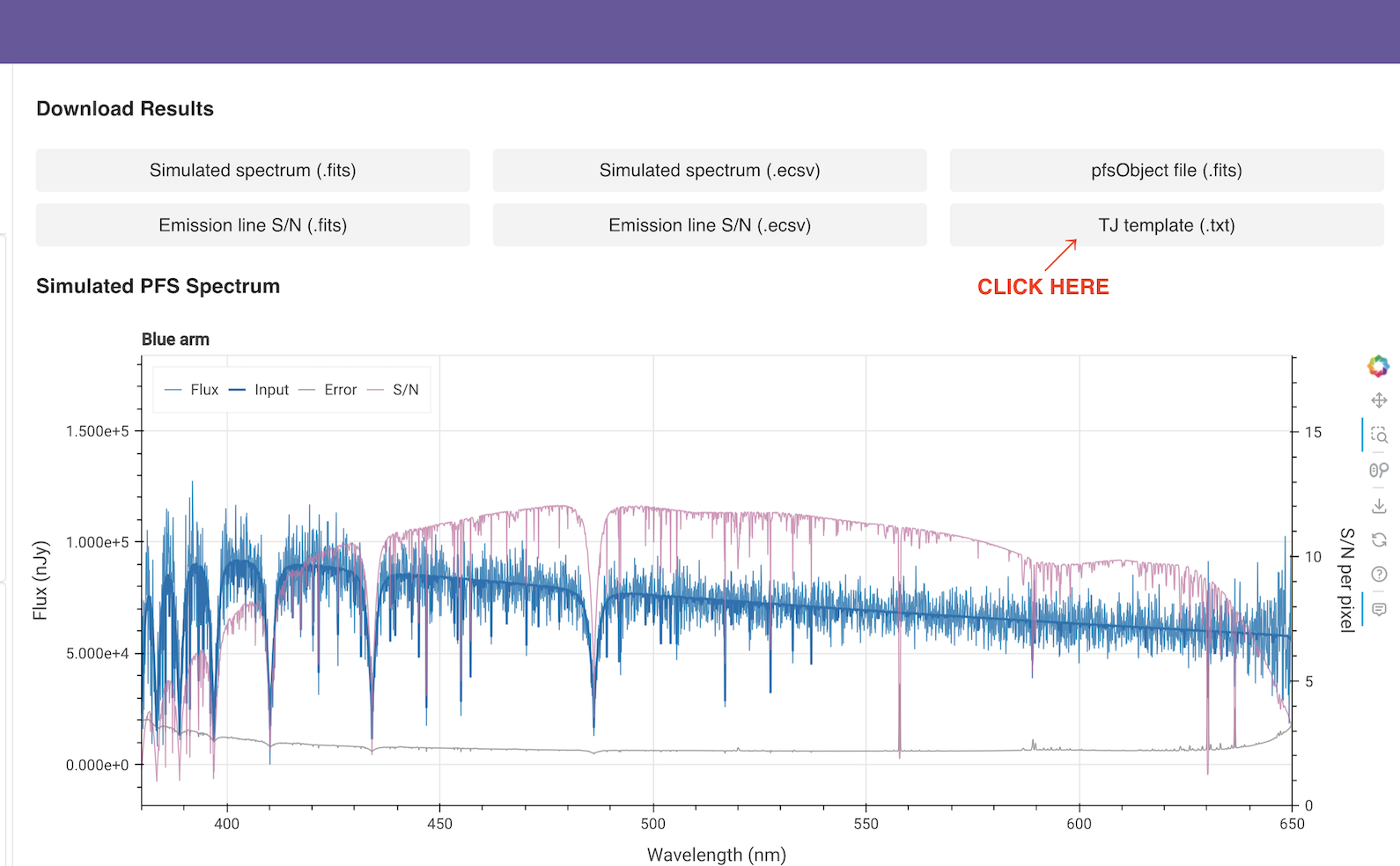
Click this button to get all parameters that were used in the exposure time calculation. Please copy and paste the information below to "Section 15. Technical Justification".
[1] Template spectrum: Flat in frequency;
[2] AB mag: 20.0;
[3] Wavelength: 550.0;
[4] Redshift: 0.0;
[5] (1) Emission line flux: 1e-17, (2) Emission line width 70.0;
[6] (1) Galactic extinction: 0.0, (2) Effective radius: 0.3;
[7] Seeing FWHM: 0.8;
[8] Throughput degradation factor: 1.0;
[9] Moon zenith angle: 30;
[10] Moon-target separation: 60;
[11] Moon phase: 0.0;
[12] Exposure time: 900;
[13] Number of exposures: 1;
[14] Distance from FoV center: 0.0;
[15] Zenith angle: 45;
[16] SimulationID: 20240726-185758-35b997982c5cb62e